

How Google Search Works: The Short Answer
Google Search does not work like a person opening your website, reading every page and manually assigning a ranking.
It is a largely automated system that discovers URLs, crawls accessible pages, renders and processes their content, decides what information should be stored in its index, and then uses its ranking systems to determine which indexed pages are most relevant for a particular search.
Google describes Search in three broad stages:
Crawling: Google discovers and fetches pages from the web.
Indexing: Google analyzes and stores information about those pages in its index.
Serving search results: When someone searches, Google retrieves relevant information from its index and orders results using its ranking systems.
That distinction is important because crawling, indexing and ranking are not the same thing.
A page can be crawled without being indexed. A page can be indexed without ranking well. And a page can technically be eligible for Search without Google guaranteeing that it will be crawled, indexed or served.
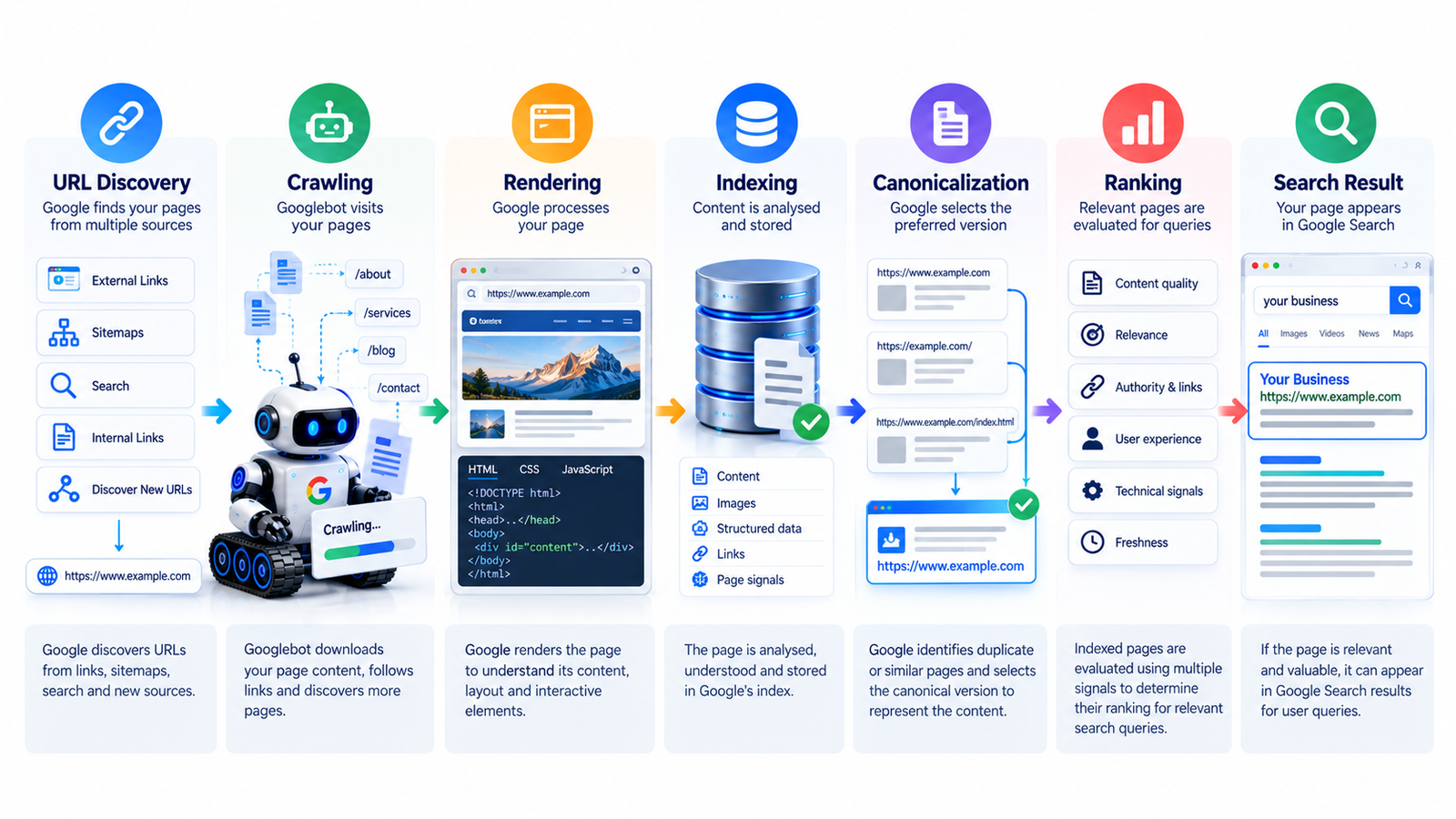
1. First, Google Has to Discover the URL
Before Google can crawl a webpage, it needs to know that the URL exists.
Google calls this URL discovery.
There is no central registry containing every webpage on the internet. Instead, Google's systems continually discover new and updated URLs through different sources.
Common discovery paths include:
Links from pages Google already knows
Internal links on your own website
Links from other websites
XML sitemaps
Redirects
Other Google-supported discovery mechanisms
For example, imagine you publish:
example.com/blog/technical-seo-guide/
If another page on your website links to that URL, Google may discover the new page while crawling the existing page.
Similarly, submitting the URL through a sitemap can help Google learn about the page.
But a sitemap is not a guarantee of indexing. Google explicitly states that a sitemap can help it discover URLs but does not guarantee that those URLs will be indexed or improve rankings.
Why internal links matter
Internal links are therefore more than a navigation feature.
They help Google understand:
Which pages exist
How pages relate to each other
Which pages are important within your site
What a linked page is about
How Google can move through your website
A page that is technically published but poorly connected to the rest of the site can be much harder for search engines to discover and understand.
2. Googlebot Crawls the Page
Once Google knows about a URL, it may attempt to crawl it.
Google uses automated crawlers, with Googlebot being the best-known crawler for Google Search. Crawling means fetching resources from a page so Google's systems can process what is there.
However, Google does not crawl every URL constantly.
Its systems determine:
Which URLs to crawl
When to crawl them
How frequently to revisit them
How many URLs to fetch from a website
Google also tries to avoid overwhelming websites. Server responses and technical conditions can influence crawling behavior.
This is why publishing a page does not mean Google will immediately crawl it.
What can prevent crawling?
Some common problems include:
The server is unavailable
DNS or network problems
Googlebot is blocked by robots.txt
The page requires authentication
Technical errors prevent Google from fetching the page
Important resources are inaccessible
A robots.txt file can tell compliant crawlers which areas they are allowed or not allowed to request.
However, robots.txt and noindex are not the same thing.
That distinction causes a lot of confusion.
3. robots.txt Controls Crawling, Not Directly Indexing
A robots.txt file is primarily a crawler-access control mechanism.
For example, you might use it to prevent crawlers from requesting certain areas of a website that should not be crawled.
But blocking a URL in robots.txt does not function as a universal instruction saying:
"Never put this URL in Google's index."
If Google discovers a blocked URL through other signals, the URL can still potentially be known to Google even though its contents could not be fetched.
If your intention is to control whether a page can appear in Search, indexing controls such as the noindex directive are a separate consideration.
This is one reason technical SEO needs to look at the complete crawl-and-index system rather than treating robots.txt as an all-purpose SEO control.
4. Crawling Is Not the Same as Seeing the Final Page
Modern websites often rely heavily on JavaScript.
That creates another important step: rendering.
Google explains that during crawling it can render pages and execute JavaScript using a recent version of Chrome. Rendering matters because some websites do not put all of their meaningful content directly into the initial HTML response.
Consider a simple example.
A browser may initially receive a page containing:
Navigation
A JavaScript application
Loading containers
JavaScript then loads:
Product information
Reviews
Images
Prices
Related content
A human visitor may eventually see everything.
But Google's ability to understand the page depends on whether the important content and resources can actually be accessed and rendered correctly.
Google itself notes that it does not necessarily see exactly what a user sees in a browser.
This is why JavaScript SEO matters
If important content depends on JavaScript, technical SEO should verify that Google can:
Fetch the page
Access the required resources
Render the page
See the important content
Understand the resulting page
A page that looks perfect to a human but fails during rendering can create serious search visibility problems.
5. Google Analyzes the Page
After crawling and processing a page, Google tries to understand what the page is about.
This is the beginning of the indexing stage.
Google analyzes things such as:
Textual content
Page title
Important metadata
Images
Video
Alt attributes
Page structure
Other content signals
The goal is not simply to store a copy of your HTML.
Google is trying to understand the meaning and characteristics of the page so it can determine whether and how the page belongs in its Search index.
This is why writing a page purely for a keyword is not enough.
A page should make its subject clear through its actual content, structure and context.
6. Google Decides Whether the Page Belongs in Its Index
Here is another common misconception:
"If Google crawled my page, it must be indexed."
No.
Google explicitly says indexing is not guaranteed. Not every page that Google processes will be included in its index.
Several things can influence whether a page gets indexed.
For example:
The page may have low-quality content
A noindex directive may prevent indexing
The website may have technical problems
The page may be a duplicate or near-duplicate
Google may determine that another URL is the canonical version
The page may not provide enough useful value to warrant inclusion
This creates an important SEO diagnostic sequence:
Published → Discovered → Crawled → Rendered → Processed → Indexed
A problem at any stage can prevent the page from reaching the next one.
7. Canonicalization Helps Google Choose Between Similar URLs
Large websites frequently have multiple URLs that contain substantially similar content.
For example:
HTTP and HTTPS versions
URLs with tracking parameters
Product filtering URLs
Duplicate category paths
Regional versions
Different URL variations pointing to similar content
Google groups similar pages and selects what it considers the representative, or canonical, URL.
You can give Google signals about which URL you prefer through methods such as:
rel="canonical"Redirects
Sitemap inclusion
Consistent internal linking
URL structure
But canonicalization is important because your declared preference is a hint, not an absolute command. Google can select a different canonical URL when its systems determine another URL is more representative.
Why this matters for SEO
Suppose your website has five URLs containing essentially the same article.
You do not necessarily want Google treating those as five separate pieces of valuable content.
You want Google to understand which URL represents the primary version.
That makes canonicalization an important part of technical SEO.
If you are unsure whether duplicate URLs, indexing problems, redirects or technical configuration are affecting your website, a professional SEO audit can help identify where the search pipeline is breaking.
8. Google Stores Information in Its Search Index
Once Google processes a page, relevant information can be stored in Google's enormous Search index.
Think of the index as Google's searchable database of information it has processed from the web.
But it is important not to imagine the index as a simple folder containing one copy of every website.
Google collects and organizes information about pages, their content and relationships.
It also collects signals that can later be used when determining which results are relevant for a search query.
This is why being indexed is only an eligibility step, not a ranking victory.
Your page can be in Google's index and still receive almost no organic traffic.
9. Ranking Happens When Someone Searches
This is where the process changes.
Google does not generally calculate one permanent ranking position for every page and leave it there.
When someone enters a query, Google's systems retrieve potentially relevant information from its index and determine which results are most useful for that particular search.
Google says relevance is determined using hundreds of factors, and factors such as the user's location, language and device can affect results.
For example, someone searching for:
"SEO company near me"
has a different intent from someone searching:
"how does Google indexing work?"
The first query may require local results and businesses.
The second is primarily informational.
Google's search-result features can also change depending on the query.
10. Ranking Is Not Just About Keywords
One of the biggest misconceptions in SEO is:
"If I put the keyword on my page enough times, Google will rank it."
That is not how modern Search works.
Keywords still matter because they help communicate the subject of a page, but ranking involves much more than matching words.
Google's systems evaluate relevance and quality using many signals.
Depending on the query and context, these can include signals related to:
Relevance to the search
Content quality
Search intent
Page experience and usability
Language
Location
Freshness where appropriate
Links and relationships between pages
Spam and policy compliance
Other ranking-system signals
Google's Search Essentials also makes clear that meeting technical requirements and best practices does not guarantee that a page will rank or even be served in Search.
This is why SEO should focus on creating pages that genuinely satisfy the searcher's need rather than trying to manipulate a single ranking signal.
11. Search Results Can Be Different for Different People
Imagine two people search for:
"dentist near me"
One person is in Delhi.
Another is in Indore.
They may not receive the same results.
Google explains that factors such as location, language and device can influence which results are most relevant.
The same principle applies to different search intents.
Someone searching:
"best running shoes"
may receive product-oriented results.
Someone searching:
"how to choose running shoes"
may receive informational content.
Someone searching:
"Nike running shoes size 10"
has a much more specific commercial or transactional intent.
Therefore, ranking is not simply:
Page + Keyword = Position
It is closer to:
Query + Context + Relevant Indexed Pages + Ranking Systems = Search Results
12. Why a Page Can Be Indexed but Still Not Rank
This is one of the most important distinctions for website owners.
Suppose Search Console shows that a URL has been indexed.
You search for the target keyword and cannot find the page.
That does not automatically mean Google has failed.
The page may be indexed but:
Not relevant enough for that query
Competing against stronger pages
Targeting the wrong search intent
Providing less useful information
Too similar to other available content
Affected by quality or spam-related signals
Not strong enough to be selected for that particular query
Google explicitly notes that an indexed page may not appear for a search because its content may be irrelevant to the query, its quality may be low, or other serving restrictions may apply.
So the correct SEO question is not always:
"Why isn't Google indexing my page?"
Sometimes the real question is:
"Why isn't Google choosing this page for the searches I care about?"
Those are two completely different problems.
13. Internal Links Connect the Entire Search Pipeline
Internal linking is often discussed as a way to distribute authority.
That is only part of the story.
Internal links can also help Google discover URLs and understand the relationship between pages.
Imagine a website with these pages:
SEO Guide → Technical SEO → SEO Audit → SEO Services → Contact
That structure gives both users and search engines a logical path through the website.
For example, an educational article about Google's crawling process can naturally lead to a page explaining technical SEO problems.
A reader who discovers the article through Google may then realize that their own website needs a technical review.
That is where SEO content becomes part of a business funnel rather than simply generating traffic.
14. What Your Website Should Do at Each Stage
The simplest way to understand SEO technically is to map your actions to Google's process.
| Google stage | What Google needs | What you should focus on |
|---|---|---|
| Discovery | A way to find the URL | Internal links, sitemap, external links |
| Crawling | Access to the URL | Server health, robots.txt, status codes |
| Rendering | Accessible resources and usable page output | JavaScript, CSS, images and content accessibility |
| Indexing | Understandable, indexable content | Quality, structure, metadata, canonicalization |
| Ranking | Strong relevance and useful content | Search intent, content quality, authority and overall SEO |
| Serving | A result suitable for the query | Relevance, context, search features and ranking signals |
The key is that you cannot fix a ranking problem by only looking at ranking.
If Google cannot crawl the page, ranking optimization is premature.
If Google crawls it but does not index it, you have an indexing problem.
If Google indexes it but it does not perform, you may have a relevance, quality, competition or search-intent problem.
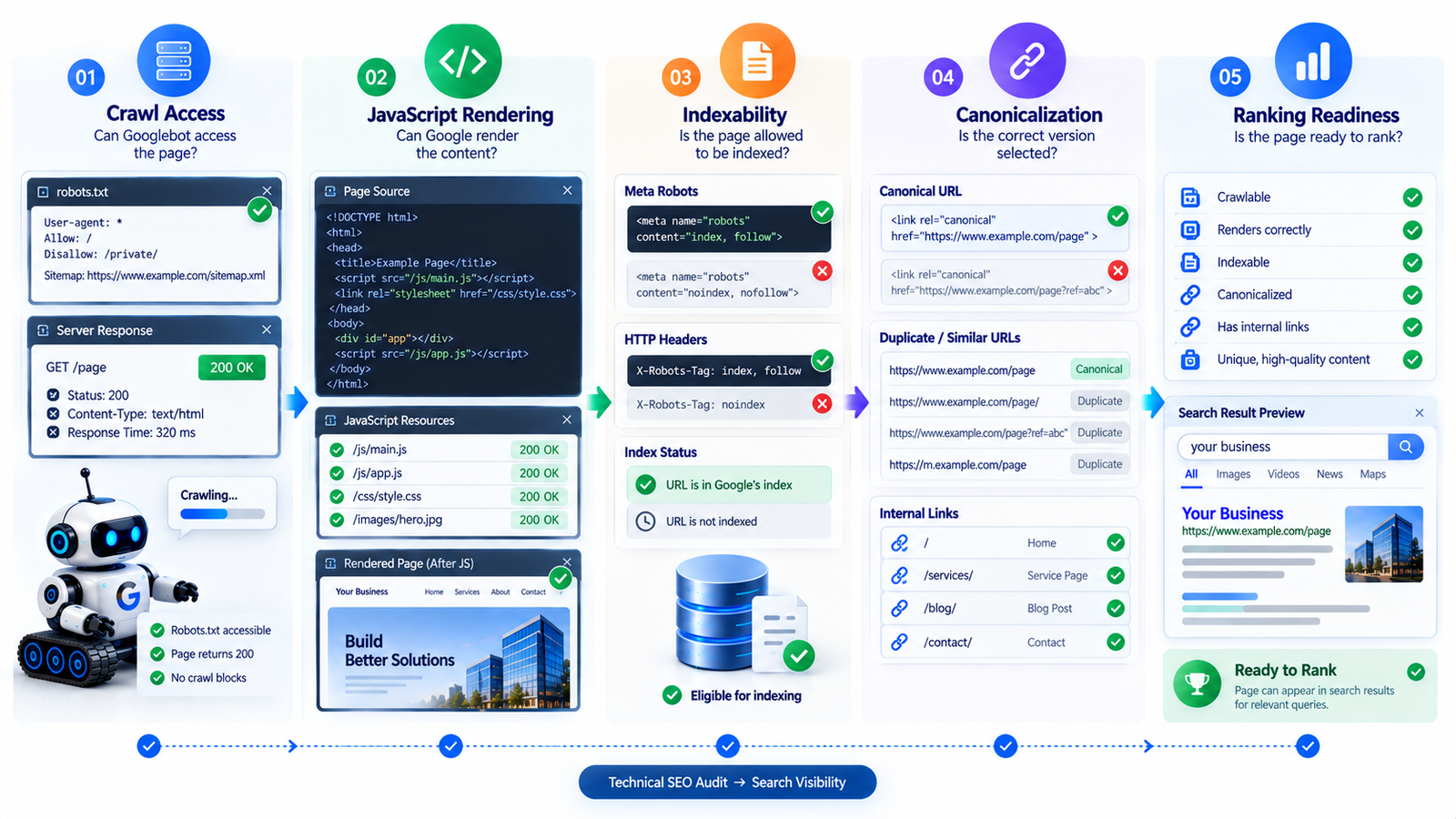
15. A Practical Google Search Troubleshooting Checklist
When a new page is not appearing in Google, work through the process in order.
Step 1: Is the URL live?
Open the URL yourself.
Check that it:
Loads normally
Does not require a login
Returns the expected HTTP status
Does not redirect unexpectedly
Step 2: Can Google access it?
Check:
robots.txt
Server errors
DNS/network issues
Authentication requirements
Important blocked resources
Step 3: Is the page allowed to be indexed?
Check for:
noindexIncorrect canonical tags
Conflicting indexing directives
Step 4: Can Google discover the page?
Check:
Internal links
XML sitemap
Navigation
Orphan-page problems
Step 5: Can Google understand the page?
Review:
Page title
Main heading
Main content
Supporting text
Images and alt text
JavaScript-rendered content
Page structure
Step 6: Is Google choosing another URL?
Check for:
Duplicate pages
Similar URLs
Canonicalization
Redirects
Parameter variations
Step 7: If indexed, why isn't it performing?
Now investigate:
Search intent
Content quality
Topical coverage
Competition
Internal linking
External signals
User experience
Search-result presentation
This order prevents you from wasting time trying to improve rankings on a page Google cannot properly access or index.
16. Google Search Console Helps You See What Is Happening
Google Search Console is one of the most useful tools for diagnosing the Search pipeline.
It can help you investigate:
Indexing status
URL inspection
Search queries
Impressions
Clicks
Sitemap submissions
Search performance
Technical issues
Some crawling information
For example, the URL Inspection tool can help you determine how Google sees a specific URL.
Google recommends checking whether Googlebot can access the page, whether robots.txt is unintentionally blocking it and whether noindex rules are preventing indexing when troubleshooting visibility.
Search Console does not tell you every detail of Google's ranking systems, but it gives you valuable evidence about how your website is being processed.
17. Where Technical SEO Fits Into the Process
Technical SEO is not a separate activity that exists only to make an SEO audit report look impressive.
It supports the underlying Search pipeline.
Technical SEO can help ensure that Google can:
Discover important URLs
Crawl them efficiently
Access required resources
Render important content
Understand page relationships
Handle redirects correctly
Identify canonical URLs
Process structured data where appropriate
Understand your site's architecture
Google's own documentation recommends ensuring that resources and pages intended for crawling are accessible and not unintentionally blocked. It also recommends using sitemaps to help Google discover and prioritize URLs.
For websites with technical problems, fixing the underlying architecture can be more valuable than publishing dozens of additional articles.
Mid-article CTA
Not sure whether Google can properly crawl and index your website?
A technical issue can stay hidden behind a perfectly designed website. If important pages are blocked, duplicated, poorly linked or incorrectly configured, more content alone may not solve the problem.
Get your website reviewed with an SEO audit.
18. Sitemaps Help Google Discover Important URLs
An XML sitemap is essentially a structured list of URLs that you want Google to know about.
Sitemaps can be particularly useful for:
Large websites
New websites
Frequently updated websites
Websites with complex architectures
Pages that are not easily discovered through internal links
But there is an important limitation.
A sitemap does not mean:
"Google must index these pages."
It means:
"Here are URLs that I want Google to know about."
Google still decides whether and how to crawl, index and serve those pages.
That distinction is essential when diagnosing indexing problems.
19. More Content Does Not Automatically Mean More Rankings
Once people understand crawling and indexing, another misconception often appears:
"If Google can crawl my site, I should publish hundreds of pages."
Not necessarily.
Google's Search Essentials emphasize helpful, reliable content and people-first practices. Meeting technical requirements does not automatically make a page competitive in Search.
A website with 50 genuinely useful pages can be stronger than one with 500 thin pages created mainly to target keywords.
The goal is not to maximize URLs.
The goal is to build useful, discoverable, understandable pages that deserve to appear for relevant searches.
20. What Actually Happens After You Publish a New Page?
Let's put everything together with a simple example.
Suppose you publish a page called:
"Technical SEO Checklist for Small Business Websites"
Stage 1: Discovery
Google finds the URL through an internal link or sitemap.
Stage 2: Crawling
Googlebot requests the URL.
Stage 3: Rendering
Google processes the page and executes relevant JavaScript when required.
Stage 4: Processing
Google analyzes the page's text, title, images, structure and other information.
Stage 5: Canonicalization
If similar versions exist, Google determines which URL is the representative version.
Stage 6: Indexing
Google decides whether the page should be included in its index.
Stage 7: Search
Someone searches:
"technical SEO checklist for small business"
Google searches its index for potentially relevant information.
Stage 8: Ranking
Google's systems evaluate which available results are most relevant and useful for that search.
Stage 9: Serving
Google presents the selected results in the Search experience, potentially alongside other search features depending on the query.
That is the journey between:
"I published a page."
and
"Someone found my page through Google."
21. Crawling, Indexing and Ranking: The Difference in One Example
These three concepts are easier to remember with a simple analogy.
Imagine a library.
Crawling = Finding the book
The librarian discovers that a new book exists.
Indexing = Cataloguing the book
The librarian records what the book is about and where it belongs.
Ranking = Choosing which books to recommend
Someone asks a question, and the librarian decides which books are most relevant to that question.
A book can be:
Known but not catalogued
Catalogued but rarely recommended
Highly relevant for one question
Completely irrelevant for another question
Web search works differently from a physical library in many technical ways, but this analogy explains why being indexed does not automatically mean ranking.
22. What Website Owners Should Focus on
You do not need to understand every internal component of Google's infrastructure to improve a website.
But you should understand the fundamentals.
Make important pages discoverable
Use logical navigation, contextual internal links and XML sitemaps where appropriate.
Keep Googlebot's access clean
Avoid accidental blocking, server failures and inaccessible resources.
Make pages understandable
Use clear titles, headings, descriptive content and logical structure.
Control indexing intentionally
Review noindex directives, canonical URLs and duplicate content.
Build useful content
Create pages that genuinely satisfy the searcher's purpose rather than pages written only to target keywords.
Strengthen topical relationships
Connect related pages through useful internal links and clear site architecture.
Monitor actual Search performance
Use Search Console to identify indexing and performance problems instead of guessing.
If these technical areas are difficult to manage, you can explore professional technical SEO support rather than trying to troubleshoot everything manually.
23. Common Misconceptions About Google Search
"Submitting a sitemap guarantees indexing."
False. A sitemap helps Google discover URLs but does not guarantee crawling or indexing.
"If Google crawled my page, it will rank."
False. Crawling is only an early stage of the process.
"If a page is indexed, it will rank for its target keyword."
False. Indexing and ranking are separate.
"robots.txt removes a page from Google."
Not necessarily. robots.txt primarily controls crawling access.
"More keywords mean higher rankings."
Not automatically. Search relevance involves many signals and the overall usefulness of the page.
"Google guarantees indexing if you follow all SEO best practices."
False. Google explicitly says it does not guarantee crawling, indexing or serving even when pages follow Search Essentials.
"Paying someone can make Google crawl my website faster or rank it higher."
False. Google states that it does not accept payment to crawl a site more frequently or rank it higher.
24. The Bigger Picture: SEO Is About Removing Friction
Good SEO is often described as "getting higher rankings."
But there is a more useful way to think about it.
SEO reduces friction between:
Your content → Google's systems → The searcher
Technical SEO reduces the friction involved in discovering, crawling and processing your pages.
Content SEO reduces the friction involved in understanding what your pages are about and whether they satisfy a searcher's need.
Internal linking reduces the friction involved in discovering related content and understanding site structure.
Authority and reputation signals can help Google evaluate how useful and trustworthy a result may be in appropriate contexts.
And search-intent optimization helps align your page with what the user actually wants.
That is why sustainable SEO is not one trick.
It is a system.
Final Google Search Checklist
Before expecting a new page to perform in Google, ask:
Can Google discover the URL?
Can Googlebot access it?
Is robots.txt blocking anything important?
Does the server return the correct response?
Can Google render the important content?
Is the page allowed to be indexed?
Is there a correct canonical URL?
Is the page substantially different from duplicate versions?
Is the content genuinely useful?
Does the page satisfy the intended search intent?
Are important pages connected through internal links?
Is the URL included in the sitemap where appropriate?
Can you inspect the URL in Search Console?
If indexed, does the page deserve to rank for the target query?
If you can answer these questions systematically, you have a much better understanding of how Google Search actually works.
Final Thoughts
Google Search is not a single ranking calculation that happens the moment you publish a webpage.
There is a process.
Google discovers the URL.
Google crawls it.
Google renders and processes it.
Google evaluates and indexes it.
Google determines which pages are relevant when someone searches.
Its ranking systems then decide which results should be shown and in what order.
Understanding this sequence changes how you approach SEO.
Instead of asking only, "How do I rank this page?", you can ask better questions:
Can Google find it?
Can Google access it?
Can Google understand it?
Should Google index it?
Is it the right page for this search?
And does it provide enough value to compete?
Those are much more useful SEO questions.
If your website is technically accessible but still struggling with visibility, the next step is to identify exactly where the process is breaking rather than blindly publishing more content.
Get a practical SEO audit to identify technical, indexing and on-page issues that may be limiting your search visibility.
Need ongoing SEO help? Explore SEO services or contact Sandeep SEO Expert to discuss your website and business goals.
FAQ
1. How long does Google take to crawl a new website?
There is no fixed guaranteed timeframe. Google says crawling and indexing depend on many factors, and it cannot guarantee when or whether a particular URL will be crawled or indexed.
2. What is the difference between crawling and indexing?
Crawling is the process of fetching and processing a webpage. Indexing is the process of analyzing information about that page and potentially storing it in Google's Search index. A crawled page is not automatically guaranteed to be indexed.
3. Does Google crawl every page on a website?
No. Google discovers very large numbers of URLs, but it does not necessarily crawl every URL. Crawling depends on factors including access, technical conditions and Google's systems for determining what to crawl and when.
4. Does submitting an XML sitemap improve rankings?
A sitemap can help Google discover URLs, but submitting one does not guarantee indexing or improve rankings by itself.
5. Why is my page indexed but not ranking?
Indexing only means Google has included the page in its index. The page may still be less relevant, less useful, less competitive or less appropriate for a particular query than other available results.
6. Does Google use hundreds of ranking factors?
Google says relevance is determined by hundreds of factors. The exact systems and signals can change over time, so there is no single public checklist that guarantees a specific ranking position.
7. Does Google guarantee first-page rankings?
No. Google does not guarantee that a page will rank, and claims of guaranteed #1 rankings should be treated with skepticism.
8. Can technical SEO affect crawling and indexing?
Yes. Problems involving server availability, robots.txt, JavaScript rendering, indexing directives, canonicalization, redirects and site architecture can affect how Google accesses and processes a website.
9. How can I check whether Google can access my page?
Google Search Console's URL Inspection tool can help you investigate how Google accesses and processes a specific URL. Google recommends using it when troubleshooting pages that are not appearing as expected.