
If your business is not appearing prominently on Google Maps, the answer is usually not another shortcut, another keyword in your business name or a batch of fake reviews.
Google says local results are mainly influenced by relevance, distance and prominence. Businesses can improve their local visibility by keeping their information complete and accurate, managing reviews, adding useful photos and videos, and building stronger signals around the business.
The important part is understanding what you can actually influence.
You cannot control how far a searcher is from your business. You cannot pay Google for better organic local ranking. And you cannot guarantee that your business will appear in a particular position for every search.
What you can do is make your business easier for Google to understand, more useful for customers and more credible across the local search ecosystem.
This guide explains how to improve your Google Maps ranking without relying on spam tactics that can damage your visibility or put your Business Profile at risk.
Quick Answer: How Do You Improve Google Maps Ranking?
To improve your Google Maps ranking, focus on:
Using an accurate and relevant primary business category
Keeping your business name, address, phone number and hours accurate
Completing your Google Business Profile
Adding relevant services and business information
Building genuine customer reviews
Responding naturally to reviews
Publishing useful photos and videos
Improving your local website SEO
Building relevant local authority and mentions
Keeping business information consistent across important sources
Monitoring your local search performance
Avoiding fake reviews, fake locations, keyword stuffing and duplicate profiles
Google does not provide a checklist that guarantees a particular Maps position. Instead, these activities help strengthen the signals Google uses to understand and evaluate local businesses.
1. Understand What Actually Affects Google Maps Ranking
Before changing your profile, understand how Google's local ranking system works.
Google identifies three main factors for local results:
Relevance
Relevance describes how closely a Business Profile matches what the person is searching for.
For example, if someone searches for a fertility clinic, Google needs to understand which businesses actually provide fertility-related services.
This is why accurate categories, services and business information matter.
Distance
Distance refers to how far a business is from the person searching or the location included in the search.
This is one reason why the same business can appear differently on Google Maps depending on where the search is performed.
You cannot legitimately manipulate this factor by creating fake locations.
Prominence
Prominence refers to how well known a business is.
Google explains that prominence can be influenced by information it finds across the web, including links, articles and directories, as well as review-related signals.
This is where broader Local SEO and website SEO become important.
2. Choose the Right Primary Business Category
Your primary category is one of the most important pieces of information on your Google Business Profile.
Choose the category that best represents what your business actually is.
For example, a dental clinic should not select an unrelated category simply because it has a keyword with higher search demand.
Google's guidelines specifically say businesses should use as few categories as necessary to describe their core business and choose categories that are specific and representative. Categories should not simply be used as keywords.
Avoid this mistake
Do not keep changing categories simply because you want to test which one ranks higher.
Instead, review:
What your business primarily does
What category best represents that activity
What relevant secondary categories genuinely apply
Whether your current category matches the real-world business
The goal is accurate classification, not category manipulation.
3. Keep Your Business Name Clean
One of the most common Google Maps SEO mistakes is adding keywords to the business name.
For example:
Wrong approach:
ABC Dental Clinic | Best Dentist in Jabalpur | Dental Implant Specialist
If that is not the actual real-world business name, adding those keywords simply to improve rankings can violate Google's guidelines.
Google says the business name should reflect the real-world name used consistently on signage, websites, stationery and other branding.
Your business name should identify your business.
Your category, services, description and website content can communicate what you offer.
4. Complete Your Google Business Profile
A partially completed profile gives Google less information about your business.
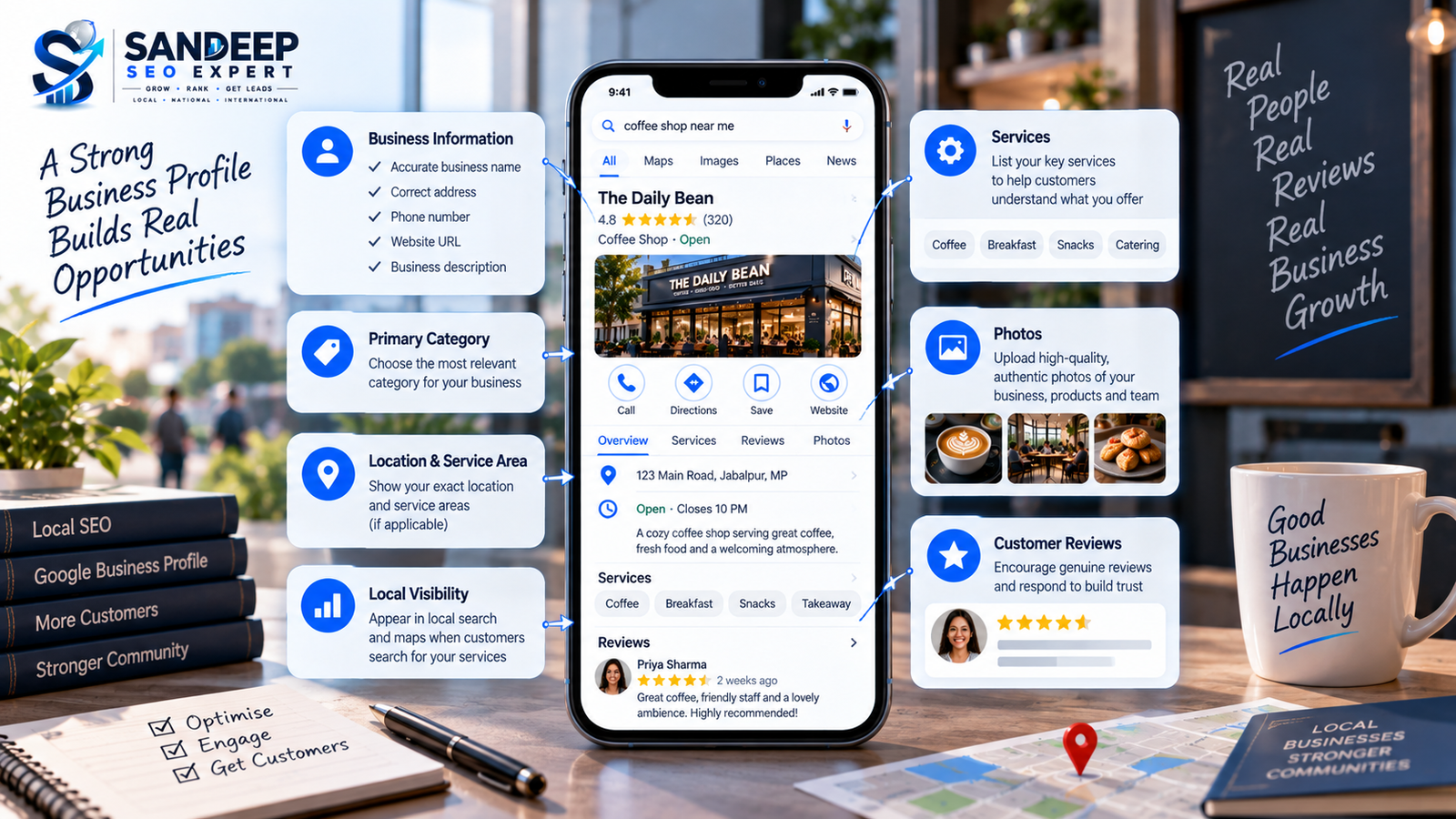
Make sure important information is accurate and current, including:
Business name
Primary category
Additional relevant categories
Address
Service area
Phone number
Website
Business hours
Special hours
Services
Attributes
Business description
Photos
Videos
Google recommends keeping Business Profile information complete and accurate because it helps customers understand what the business does, where it is and when they can visit.
Completeness alone does not guarantee a higher position, but accurate information gives Google better context about your business.
5. Add Services That Your Business Actually Provides
Services can help explain what your business offers.
A medical clinic, for example, may provide multiple specific services. A digital marketing company may provide SEO, Local SEO, technical SEO and other services.
Add relevant services that genuinely represent your business.
Do not create dozens of variations simply to insert more keywords.
The purpose of your service section should be to make your offerings clearer to customers and Google.
6. Write a Useful Business Description
Your Business Profile description should explain what the business does and what customers can expect.
A good description can naturally mention:
Main services
Products
Business experience
Areas served
What makes the business different
Relevant customer information
But do not turn the description into a keyword list.
Google's guidelines say descriptions should be useful and relevant to customers and should accurately represent the business.
Write for people first.
If the description sounds unnatural when you read it aloud, it probably needs editing.
Is Your Google Business Profile Fully Optimized?
Missing information, incorrect categories, weak local signals or inconsistent business details can limit the effectiveness of your local search presence.
Get Your Local SEO Reviewed →7. Build Genuine Google Reviews
Reviews are an important part of the local search ecosystem.
Google states that review count and positive ratings can contribute to local ranking, while reviews also help potential customers evaluate a business.
But there is a major difference between earning reviews and manufacturing reviews.
Good review practices
You can:
Ask genuine customers to leave feedback
Provide a Google review link or QR code
Make the review process easy
Respond professionally to reviews
Use feedback to improve the customer experience
Avoid
Buying reviews
Creating reviews yourself
Paying people for positive reviews
Offering discounts in exchange for reviews
Asking customers to remove negative reviews in exchange for an incentive
Creating reviews from employees or unrelated accounts
Google explicitly prohibits incentives for reviews and other forms of fake engagement.
The objective should be a genuine reputation, not an artificially inflated rating.
8. Respond to Reviews Naturally
Review responses are useful for customers and demonstrate that the business is paying attention to feedback.
But there is no reason to turn every response into an SEO paragraph.
A good response should be:
Relevant
Professional
Personal
Short enough to read easily
Appropriate to the customer's actual experience
For a positive review, acknowledge the customer's experience.
For a negative review, address the concern professionally without exposing private information or attacking the reviewer.
Google recommends keeping review responses clear, helpful and relevant rather than using them as promotional content.
9. Add Real Business Photos and Videos
Photos help customers understand what they will actually experience when they visit or use your business.
Depending on the business, useful photos may include:
Exterior
Reception
Interior
Team
Products
Services
Equipment
Work environment
Before-and-after examples where appropriate
Events or customer-facing activities
The key word is real.
Do not use random stock photos to make a profile look active.
Your photos should accurately represent the business.
Google itself recommends adding photos and videos to help customers understand what the business offers.
10. Improve Your Website's Local SEO
Your Google Business Profile should not operate in isolation.
Your website can provide additional information about your business, services, locations and expertise.
For example, a business targeting:
dentist in Jabalpur
could have a well-optimized website that clearly explains:
Dental services
Location
Contact information
Doctor information
Treatment pages
FAQs
Local relevance
Patient information
Your website and Business Profile should tell a consistent story about the business.
Google also considers information from across the web when building its understanding of local businesses.
This is why Local SEO and website SEO often work better together than treating Maps as a completely separate channel.
11. Keep Your Business Information Consistent
Check important business information across:
Website
Google Business Profile
Local directories
Industry websites
Social profiles
Other important business listings
Pay particular attention to:
Business name
Address
Phone number
Website
The goal is not to submit your business to hundreds of random directories.
A smaller number of relevant, trustworthy references can be more useful than building large numbers of low-quality listings.
12. Build Relevant Local Authority
Prominence is not something you create overnight.
For some businesses, it can be strengthened through legitimate mentions and recognition across the web.
Examples can include:
Local news coverage
Industry publications
Local organizations
Relevant business associations
Community sponsorships
Local partnerships
Industry directories
Genuine local links
Helpful content that earns references
The important word is relevant.
Buying hundreds of unrelated backlinks or submitting a business to low-quality directories is not the same as building genuine local authority.
13. Create Location-Relevant Website Content
If your business serves a particular city or region, your website should clearly communicate that.
Depending on the business model, useful content may include:
Location pages
Service pages
Local FAQs
Area-specific guides
Case studies
Local service information
Helpful customer resources
Do not create dozens of almost identical city pages just by replacing the city name.
The page should provide genuine value for people in that location.
Your Google Business Profile Should Generate More Than Views
A profile can look complete and still fail to turn local searches into meaningful enquiries. Review your local visibility, profile setup and website journey together.
Explore Google Business Profile SEO →14. Use Google Posts for Customers, Not Ranking Tricks
Google Business Profile posts can be useful for communicating:
Announcements
Events
Offers
Updates
New services
Business information
But publishing posts simply to insert keywords repeatedly should not be your strategy.
Think of posts as customer communication rather than a shortcut to Maps rankings.
The content should have a reason to exist.
15. Make Your Local Search Strategy Match Your Business
Different businesses need different local SEO strategies.
Local clinic
Focus on:
Correct categories
Doctor or practitioner information
Services
Genuine reviews
Local website pages
Relevant medical content
Accurate contact information
Restaurant
Focus on:
Correct restaurant category
Menu information
Photos
Hours
Reviews
Location accuracy
Customer experience
Home service business
Focus on:
Correct service area
Relevant services
Genuine reviews
Service-specific website pages
Local authority
Accurate phone and contact information
Retail business
Focus on:
Accurate location
Business hours
Products where available
Photos
Reviews
Local website optimization
There is no single Google Maps SEO checklist that works identically for every business.
16. Do Not Create Fake Locations
This is one of the biggest spam tactics to avoid.
If your business operates from one legitimate location, do not create additional Business Profiles in different cities simply because you want to rank there.
Google's guidelines require businesses to accurately represent their real-world locations and place restrictions on virtual offices and other misleading location practices.
If you genuinely have multiple eligible locations, each location can be managed according to Google's guidelines.
But a fake address is not a Local SEO strategy.
17. Do Not Stuff Keywords Into Your Business Profile
Adding the same keyword repeatedly does not make a profile more trustworthy.
Avoid keyword stuffing in:
Business name
Description
Services
Posts
Review responses
Website content
Image names
Other profile fields
For example, repeatedly writing:
Best Dentist in Jabalpur | Top Dentist in Jabalpur | Dentist Jabalpur | Dental Clinic Jabalpur
does not create useful content.
Use natural language and describe the actual business.
18. Do Not Create Duplicate Business Profiles
Creating multiple profiles for the same business can create confusion and may violate Google's guidelines.
Google's guidelines state that there should generally be one profile per business, with specific exceptions for eligible practitioners, departments and locations.
If you already have duplicate profiles, investigate the situation rather than creating even more profiles.
19. Do Not Buy Fake Reviews
Fake reviews can create a temporary appearance of popularity, but they are not a sustainable SEO strategy.
Google requires reviews to reflect genuine customer experiences and prohibits fake engagement and incentivized reviews.
Instead of asking:
How can I get 100 reviews quickly?
Ask:
How can I consistently create a customer experience worth reviewing?
That shift produces a much healthier long-term strategy.
20. Do Not Believe Anyone Promising Guaranteed Google Maps Rankings
No legitimate SEO professional can guarantee a specific Google Maps position for every search.
Google states that there is no way to request or pay for a better local ranking.
Google's third-party policies also prohibit unrealistic claims such as guaranteeing top placement.
Be cautious when an agency promises:
Guaranteed #1 Maps ranking
Permanent top 3 position
Secret Google partnership
Guaranteed ranking within a fixed number of days
Paid access to Google's ranking system
A professional SEO strategy should explain what can be improved, how it will be measured and what factors remain outside the business's control.
21. Track More Than Your Position
A Google Maps ranking position is useful, but it is not the whole story.
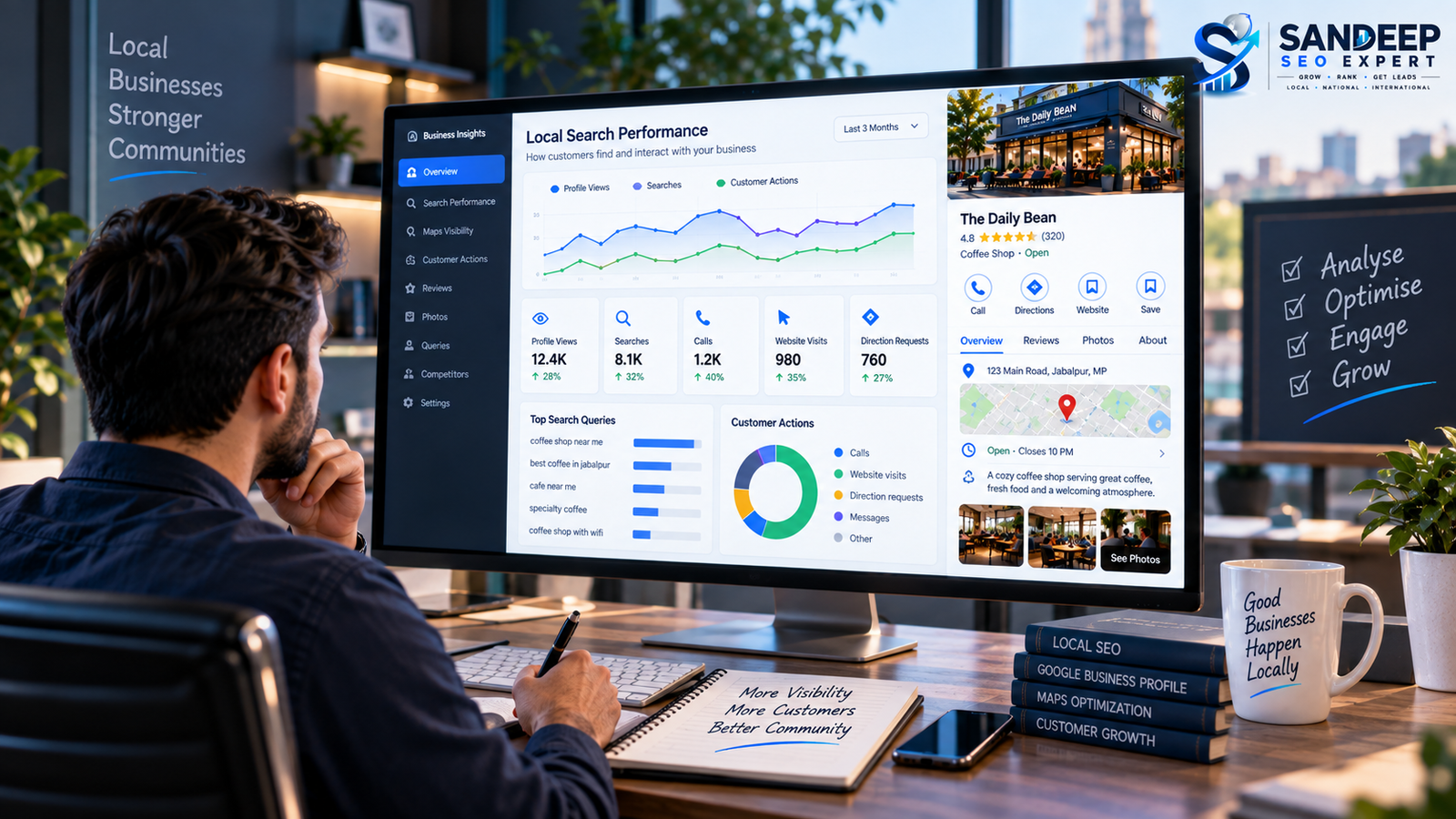
Your business should also monitor meaningful outcomes such as:
Calls
Website visits
Direction requests
Customer enquiries
Search queries
Profile views
Review growth
Conversion quality
Google Business Profile provides performance information that can help businesses understand how customers discover and interact with their profiles.
A business ranking in position 2 but receiving poor-quality enquiries may need a different strategy from a business ranking lower but generating valuable customers.
22. Remember That Rankings Can Vary by Searcher
Do not assume that one Google Maps search represents everyone's results.
Local results can change depending on factors such as:
Searcher's location
Search query
Business relevance
Competition
Search context
This is why repeatedly searching your own business from the same location is not a reliable complete measurement strategy.
Track relevant queries from appropriate locations and combine ranking observations with actual Business Profile and website performance data.
23. A Practical Google Maps SEO Workflow
Instead of trying random tactics every week, use a structured process.
Step 1: Audit the Business Profile
Check:
Name
Category
Address
Service area
Phone
Website
Hours
Description
Services
Attributes
Photos
Reviews
Step 2: Identify the Search Terms That Matter
Look at what customers actually search for.
Separate:
Core service terms
Local service terms
Problem-based searches
Product searches
Brand searches
Step 3: Compare Relevant Competitors
Review businesses appearing for important searches.
Look at:
Categories
Services
Reviews
Website quality
Local relevance
Business information
Content
Local authority
The goal is not to copy competitors.
The goal is to identify gaps.
Step 4: Improve the Website
Strengthen relevant service and location pages.
Make sure your website clearly explains what you offer and where you operate.
Step 5: Build Genuine Reputation
Create a consistent process for requesting genuine customer feedback.
Respond to reviews naturally.
Step 6: Strengthen Local Authority
Work toward relevant local mentions, partnerships, publications and links.
Step 7: Measure Results
Monitor profile interactions, website traffic, enquiries and relevant search visibility.
Then refine the strategy based on actual data.
24. Google Maps Ranking Checklist
Use this checklist when auditing a local business:
| Area | What to Check |
|---|---|
| Business Name | Matches the real-world business name |
| Primary Category | Accurately represents the core business |
| Additional Categories | Only relevant categories used |
| Address | Accurate and legitimate |
| Service Area | Correct for the actual business |
| Phone | Correct business contact |
| Website | Correct business website |
| Hours | Current and accurate |
| Services | Relevant services added |
| Description | Useful and natural |
| Photos | Real, relevant and current |
| Reviews | Genuine customer experiences |
| Review Responses | Relevant and professional |
| Website SEO | Local services and locations clearly covered |
| Local Authority | Relevant mentions and links |
| Business Listings | Important information kept consistent |
| Spam Risks | No fake locations, reviews or keyword stuffing |
| Measurement | Profile and business outcomes tracked |
Your Google Business Profile Should Generate More Than Views
A profile can look complete and still fail to turn local searches into meaningful enquiries. Review your local visibility, profile setup and website journey together.
Explore Google Business Profile SEO →25. How Long Does Google Maps SEO Take?
There is no universal timeline for improving local visibility.
The time required depends on factors such as:
Current profile quality
Competition
Location
Business prominence
Website strength
Review profile
Local authority
Search demand
Existing technical issues
Some profile changes can become visible relatively quickly, while broader improvements in authority and organic visibility can take considerably longer.
A realistic SEO strategy should therefore focus on improving the underlying signals rather than promising a fixed ranking date.
What Should You Do If Your Business Is Not Ranking on Google Maps?
Do not immediately create another profile or start buying reviews.
Start with an audit.
Check whether:
Your profile is verified and visible.
Your business information is accurate.
Your primary category is appropriate.
Your services are clearly represented.
Your website supports the same local relevance.
You have genuine customer reviews.
Your business information is consistent across important sources.
Your competitors have stronger local authority.
Your location naturally limits visibility for certain searches.
Your website has technical or content problems affecting organic visibility.
Sometimes the problem is not a missing Google Business Profile field.
It may be a broader Local SEO issue.
Final Thoughts
Improving Google Maps ranking does not require spam.
A stronger approach is to make the business easier to understand, easier to trust and more relevant to the searches that matter.
Keep your Google Business Profile accurate. Use the right category. Add genuine services and useful photos. Earn authentic reviews. Build a strong local website. Develop relevant local authority. Keep your business information consistent and monitor the results.
Most importantly, do not confuse activity with progress.
Adding hundreds of keywords, fake reviews or unnecessary profiles may create activity, but it does not create a trustworthy local search presence.
The goal of Google Maps SEO should be to connect the right customers with the right business.
Ready to Improve Your Local Visibility?
Get your Google Business Profile and local search presence reviewed to identify the areas that need attention and improve your chances of attracting relevant local customers.
Contact Sandeep SEO Expert →Frequently Asked Questions
1. How can I improve my Google Maps ranking?
Focus on relevance, accurate Business Profile information, genuine reviews, useful photos, local website SEO and legitimate local authority. Google says local results are mainly based on relevance, distance and prominence.
2. Can I pay Google to rank higher on Maps?
No. Google states that there is no way to request or pay for a better local ranking.
3. Do more Google reviews improve Maps ranking?
Google says review count and positive ratings can contribute to local ranking. Reviews must represent genuine customer experiences, and incentivized or fake reviews are prohibited.
4. Should I add keywords to my Google Business Profile name?
Only if those words are genuinely part of the business's real-world name. Google requires the Business Profile name to accurately represent the real-world business.
5. Do Google Posts directly improve Maps rankings?
Google provides Posts as a way to share updates, offers and events, but businesses should not treat posting as a guaranteed ranking shortcut. A broader local strategy is more appropriate.
6. Can I create multiple Google Business Profiles for different cities?
Not simply to target different cities. Profiles must represent eligible real-world businesses or locations according to Google's guidelines. Creating fake locations can create policy problems.
7. How important is my website for Google Maps SEO?
Your website can support local search visibility by providing clear information about your services, locations and business. Google also uses information from websites and other sources when building information about businesses.
8. Can an SEO agency guarantee Google Maps rankings?
A legitimate agency should not guarantee a specific Maps position. Google says local ranking cannot be requested or purchased, and its third-party policies prohibit unrealistic claims such as guaranteed top placement.