

You have a website. You have published pages, added content, targeted keywords, and maybe even worked on SEO for months. But when you search Google, your website is still nowhere near where you expected it to be.
So, why is your website not ranking on Google?
The answer is usually not as simple as “you need more keywords.” A page can fail to perform because Google cannot properly access or index it, because the content does not match the searcher's intent, because several pages are competing for the same topic, or because stronger competitors are providing a better overall result.
There is also an important difference between being indexed and ranking well. Google can know that your page exists without deciding that it deserves a prominent position for a particular search. Google itself explains that meeting basic technical requirements does not guarantee that a page will be crawled, indexed, or served in search results.
Before changing titles, publishing dozens of new articles, or adding more keywords, find out which problem you actually have.
Here are 15 reasons to check first.
Quick Answer: Why Is My Website Not Ranking on Google?
The most common reasons include:
Your important pages are not indexed.
A noindex directive is blocking a page.
Robots.txt or other technical settings are interfering with crawling.
Your website or page is too new to have established visibility.
Your content does not match search intent.
The keyword is more competitive than you expected.
Your content is thin, generic, outdated, or provides little additional value.
Google cannot clearly understand the topic and purpose of the page.
Your internal linking is weak.
Technical SEO problems are affecting crawling, rendering, or usability.
Multiple pages are competing for the same search intent.
Your website has limited authority or relevant external signals.
The overall page experience is poor.
Your website lacks enough useful coverage around the topic.
You are judging the result too quickly.
The important point is that these problems require different solutions. Fixing keywords will not solve a noindex problem, and publishing more content will not automatically fix poor search intent.
1. Your Important Page Is Not Indexed
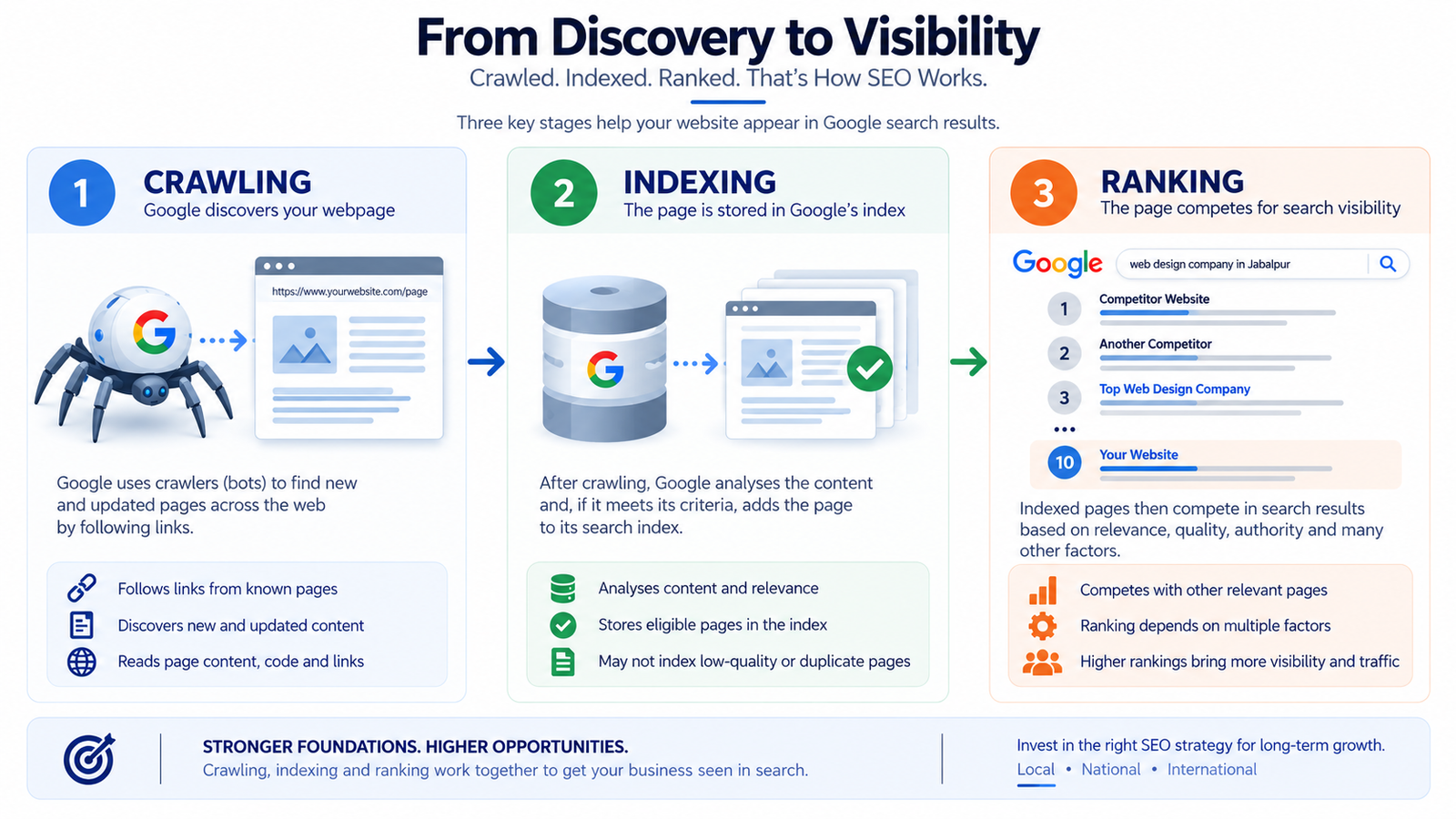
The first question is not “Why am I ranking on page five?”
It is:
Is Google actually indexing the page?
If an important page is not in Google's index, changing its title or adding more keywords will not solve the underlying problem.
A quick first check is to search Google using:
site:yourdomain.com
This can give you a basic indication of whether Google has indexed pages from your website. Google also recommends using Search Console and the URL Inspection Tool when checking how Google sees a specific page.
For an important commercial page, inspect the exact URL rather than assuming that because your homepage is indexed, every other page must be indexed too.
Check:
Is the URL indexed?
Is Google able to crawl it?
Is there a canonical pointing somewhere unexpected?
Is the page returning the correct status code?
Is the page actually accessible to Googlebot?
If the answer is no, solve the indexing problem before worrying about rankings.
2. A Noindex Tag Is Blocking the Page
Sometimes the page exists, loads normally in your browser, and looks completely fine.
But a noindex directive may be telling search engines not to include it in search results.
This can happen accidentally during website development, migrations, redesigns, CMS configuration, or plugin changes.
Google's documentation explains that a noindex directive can prevent a page from appearing in Search.
Check the page's indexing settings and inspect the source or Search Console data if necessary.
This is one of those SEO problems where a five-minute technical check can be more valuable than publishing another 2,000-word article.
3. Robots.txt Is Preventing Important Crawling
Your robots.txt file can control which areas of a website crawlers are allowed to access.
If an important section has been accidentally blocked, Google may have difficulty crawling the URLs or resources it needs.
But there is an important distinction here: robots.txt is not a general replacement for noindex. Google specifically explains that robots.txt controls crawling, while noindex is used when you want to prevent a page from appearing in Search.
Review your robots.txt file for important pages, directories, scripts, or resources that should be accessible.
Do not assume that a technically valid robots.txt file is automatically a correctly configured one.
Mid-Article CTA
Not sure whether a technical issue is holding your website back?
A proper SEO audit can identify indexing, crawling, on-page, internal linking, technical and structural problems before you spend more time creating content.
Get your website reviewed with a practical SEO audit.
4. Your Website Is Too New
A new website does not automatically become competitive simply because it has been published.
Google needs to discover, crawl, index and evaluate pages. Your website may also have little history, limited relevant content, few external references, and very little evidence that it is a strong result for competitive queries.
Google's SEO documentation notes that changes can take different amounts of time to appear in search results, ranging from hours to months depending on the change and circumstances. Google generally recommends giving changes a few weeks before evaluating their impact.
That does not mean you should simply “wait for Google.”
Use the time to build useful pages, improve the website structure, strengthen internal linking, fix technical problems and create content that genuinely serves your audience.
5. Your Content Does Not Match Search Intent
This is one of the biggest reasons a page can look well optimized and still struggle.
Imagine someone searches:
“best SEO audit tools”
and your page mainly explains:
“What is SEO?”
Both pages are about SEO, but they answer different questions.
Search intent is the underlying reason behind a query. A searcher may want to:
Learn something.
Compare options.
Find a specific service.
Buy something.
Find a local business.
Solve a particular problem.
If the pages ranking for your target query are detailed comparisons and your page is a general introduction, adding the keyword another ten times will not fix the mismatch.
Look at the pages already performing for the query and ask:
What does the searcher actually expect to find?
Then make your page genuinely satisfy that expectation.
6. Your Target Keyword Is More Competitive Than You Realize
Sometimes the problem is not that your page is bad.
The problem is that you are trying to compete against much stronger pages.
A new local business website may struggle to rank immediately for broad terms such as:
SEO
digital marketing
web design
dentist
software development
That does not mean SEO is impossible.
It means your keyword strategy may need to be more realistic.
Instead of targeting only broad, highly competitive terms, identify searches with a closer relationship to your services, location, audience and expertise.
For example, a business may have a better opportunity with a specific service or problem-based search than with a huge generic keyword.
The goal is not to find the keyword with the highest search volume.
The goal is to find searches where your page can provide a genuinely competitive answer.
7. Your Content Is Too Thin or Generic
A page does not become useful simply because it contains 1,500 or 2,000 words.
Likewise, a 700-word page is not automatically thin.
The real question is:
Does the page provide enough useful information to satisfy the person who arrived from Google?
Google's people-first content guidance encourages creators to consider whether content provides substantial value, original information, useful analysis, and a satisfying experience rather than simply being created to attract search traffic.
Generic content often looks like this:
“SEO is important for businesses. You should optimize your website, use keywords and create quality content.”
There is nothing obviously wrong with those sentences, but they do not give the reader much to act on.
Useful content explains:
What the problem is.
Why it happens.
How to identify it.
What to do about it.
What mistakes to avoid.
When professional help may be appropriate.
That is much more valuable than increasing word count for its own sake.
8. Google Cannot Clearly Understand What the Page Is About
Your page may contain good information but still lack clear topical focus.
A strong page should make its primary subject obvious through its:
Main heading.
Page title.
Introduction.
Subheadings.
Body content.
Relevant internal links.
Descriptive anchor text.
Supporting context.
Google's SEO Starter Guide recommends clear organization, useful headings and natural content, while also explaining that Google can understand related variations in how people search for a topic.
This does not mean repeating the same keyword everywhere.
Instead, make the page's purpose obvious.
If the page is about technical SEO, it should actually provide useful information about technical SEO rather than mentioning the phrase repeatedly while discussing unrelated marketing topics.
9. Your Internal Linking Is Weak
A page can be excellent and still be poorly connected to the rest of your website.
Internal links help users discover related information and help search engines understand relationships between pages.
Google recommends linking to relevant resources and using descriptive anchor text so users and search engines can understand what the linked page contains.
For example, if you have an article about website ranking problems, it can naturally connect to a relevant SEO audit service when the reader needs a deeper diagnosis.
The important thing is relevance.
Do not add ten internal links just because someone told you every article needs a certain number. Link when the destination genuinely helps the reader.
10. Technical SEO Problems Are Holding the Website Back
Technical SEO covers a wide range of issues.
Your website may have problems with:
Crawlability.
Indexing.
Rendering.
Broken URLs.
Redirects.
Canonicalization.
Duplicate URLs.
JavaScript implementation.
Mobile usability.
Site architecture.
HTTPS.
XML sitemaps.
Server response issues.
Google explains that search engines need to be able to access and understand important parts of a page. If essential resources such as CSS or JavaScript cannot be accessed, Google may not understand the page as intended.
You do not need to panic every time atechnical SEO tool reports an issue.
Not every warning is equally important.
The question is:
Does this problem actually affect important URLs, crawling, indexing, rendering, usability or the ability of search engines to understand the site?
That is why prioritization matters.
If your website has widespread technical problems, fixing those may be more valuable than publishing another batch of blog posts.
11. Multiple Pages Are Competing for the Same Topic
Suppose you have five pages targeting nearly the same search intent.
One is titled:
“SEO Services”
Another:
“Professional SEO Services”
Another:
“Best SEO Services”
Another:
“SEO Company Services”
And another:
“Affordable SEO Services”
If these pages offer substantially overlapping information and target the same audience, your site architecture may become unnecessarily complicated.
This is often referred to as keyword cannibalization, although the exact cause and effect can vary from site to site.
Instead of creating multiple similar pages simply because you found slightly different keyword variations, determine whether each URL has a distinct purpose.
Sometimes the solution is to:
Consolidate overlapping content.
Improve the strongest page.
Redirect redundant pages where appropriate.
Clarify the intent of separate pages.
Strengthen the site's hierarchy and internal links.
The objective is not to have a page for every tiny keyword variation.
The objective is to have the right page for the right search intent.
12. Your Website Is Not Strong Enough for the Competition Yet
Ranking is competitive.
Even if your page is technically sound and relevant, another page may still be a better result.
Competitors may have:
More useful content.
Stronger topical coverage.
Better internal linking.
More relevant references from other websites.
Greater brand recognition.
More established websites.
Better answers to the searcher's actual question.
This does not mean you should obsess over backlinks or copy competitors.
Instead, compare the actual search results.
Ask:
What are the top-ranking pages doing better than mine?
Then identify the gaps you can realistically improve.
Build stronger content. Improve the site's architecture. Publish useful supporting resources. Earn relevant mentions and links naturally. Improve your expertise and evidence.
Authority is not something you manufacture overnight.
13. The Page Experience Is Poor
A technically indexed page can still provide a frustrating experience.
Consider whether visitors encounter:
Slow-loading pages.
Intrusive pop-ups.
Difficult mobile navigation.
Poorly structured content.
Excessive advertisements.
Layout problems.
Hard-to-read typography.
Confusing navigation.
Content hidden behind unnecessary interruptions.
Google's guidance emphasizes providing an overall good page experience rather than focusing on one isolated metric.
Do not turn this into a race to achieve a perfect score in every SEO tool.
Look at the actual user experience.
Open the page on a phone.
Can someone quickly understand what the page is about? Can they find the answer? Can they navigate to the next useful page?
Those questions matter.
14. Your Website Does Not Have Enough Useful Topical Coverage
One article rarely establishes a complete topic.
Suppose your business provides technical SEO services and publishes one basic article called “What Is Technical SEO?”
That article may be useful, but it may not demonstrate much depth.
You could potentially build supporting resources around related problems such as:
Technical SEO audit.
Crawlability problems.
Indexing issues.
Canonical errors.
XML sitemap problems.
JavaScript SEO.
Internal linking.
Site architecture.
Website migrations.
The goal is not to publish hundreds of thin articles.
Google's people-first guidance specifically warns against producing lots of content across many topics primarily in the hope that some of it will attract search traffic.
Build coverage where it makes sense for your audience and business.
Depth is more useful than content volume for its own sake.
15. You Are Judging SEO Too Quickly
SEO changes do not always appear immediately.
You publish a page today, but Google may crawl it later. It may then process and evaluate the page before you see meaningful changes in search results.
Your competitors may also change their pages during that period.
Google's documentation notes that different changes can take different amounts of time to be reflected in Search and generally recommends giving changes enough time before evaluating their impact.
This is why changing your title every few days or repeatedly rewriting an article can make diagnosis harder.
Instead:
Make a meaningful change.
Record what changed.
Monitor impressions, clicks, queries and positions.
Compare the results over a reasonable period.
Decide what to change next based on the evidence.
Do not make five major changes at once and then try to determine which one caused the improvement or decline.
How to Find the Real Reason Your Website Is Not Ranking
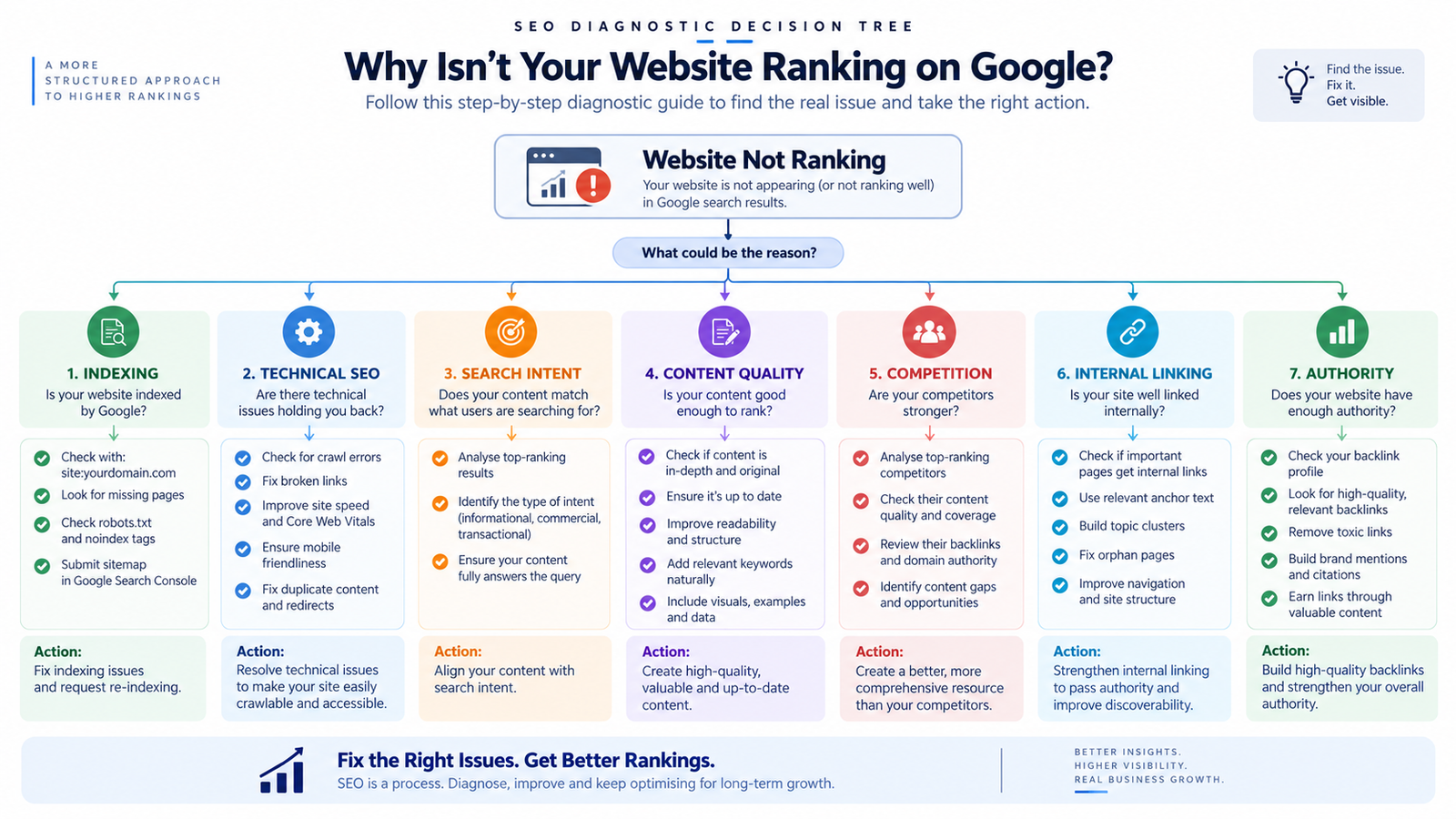
Instead of randomly changing your SEO strategy, diagnose the problem in an order.
Step 1: Check Whether the Page Is Indexed
Start with Search Console and inspect the exact URL.
If it is not indexed, investigate that before changing content.
Step 2: Check for Technical Blocks
Review:
noindexrobots.txt
canonical tags
redirects
status codes
sitemap configuration
important resources
crawlability
rendering
Fix genuine blockers first.
Step 3: Check Search Intent
Search the target query yourself.
Look at the pages appearing near the top.
Ask:
Does my page provide the type of result this searcher actually wants?
If not, fix the content strategy.
Step 4: Compare Your Page With the Actual Competition
Do not compare yourself only with websites you think are competitors.
Compare the pages Google is actually ranking.
Look at:
Content depth.
Relevance.
Page structure.
Experience.
Topical coverage.
Internal links.
External references.
Trust signals.
Business relevance.
The search results themselves can reveal what Google is currently rewarding for that query.
Step 5: Fix the Biggest Bottleneck First
If the page is blocked from indexing, fix indexing.
If the content answers the wrong question, fix search intent.
If several pages compete with each other, fix the architecture.
If competitors are much stronger, build better content and authority over time.
If the website has widespread technical problems, address those before endlessly publishing new articles.
SEO becomes much easier when you stop treating every ranking problem as a keyword problem.
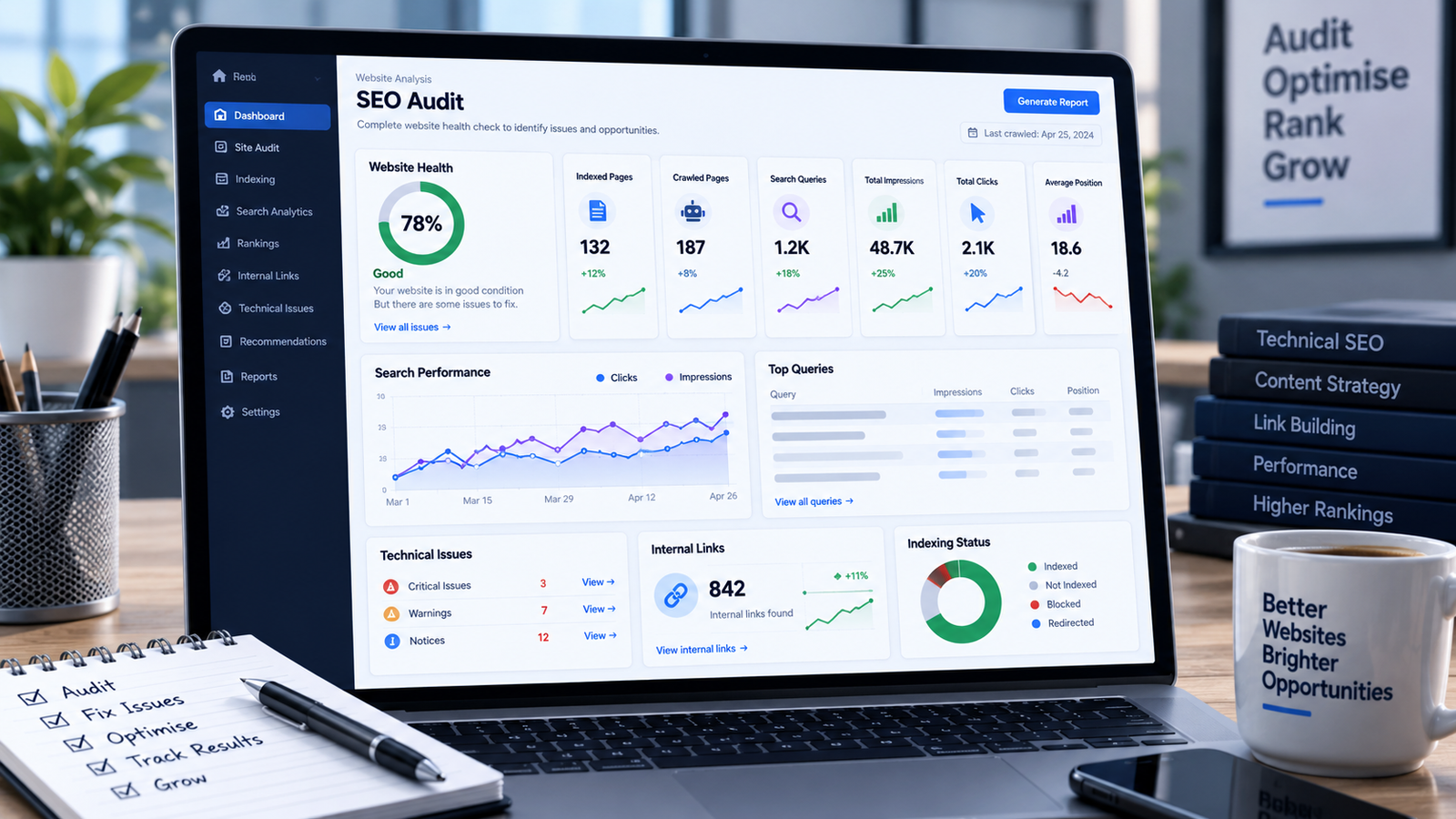
A Simple Website Ranking Diagnostic Checklist
| What to Check | What It Tells You |
|---|---|
| Is the page indexed? | Whether Google has included the URL in its index |
| Is there a noindex directive? | Whether the page is intentionally or accidentally excluded |
| Is crawling blocked? | Whether Google can access important content |
| Is the canonical correct? | Whether Google is being given the intended preferred URL |
| Does the content match search intent? | Whether the page answers the right question |
| Is the keyword highly competitive? | Whether your current level of authority can realistically compete |
| Is the content genuinely useful? | Whether the page provides meaningful value |
| Are internal links relevant? | Whether users and search engines can discover related pages |
| Are multiple pages targeting the same intent? | Whether your site architecture needs improvement |
| Is the website technically healthy? | Whether technical problems are limiting performance |
| Is the page experience good? | Whether visitors can easily use and understand the page |
| Has enough time passed? | Whether you have enough data to judge the change |
What You Should Not Do When Your Website Is Not Ranking
A ranking problem often becomes worse when the response is random.
Avoid these reactions:
Do not stuff the keyword everywhere
Repeating the exact keyword more times does not automatically make a page more relevant.
Do not publish dozens of low-value articles
More URLs do not automatically mean more visibility. Google explicitly emphasizes helpful, people-first content and warns against scaled creation of unoriginal, low-value pages designed primarily to manipulate search rankings.
Do not change everything at once
If you change the title, content, URL, internal links, site structure and technical configuration simultaneously, diagnosing the result becomes difficult.
Do not obsess over one SEO score
Third-party tools can help identify potential problems, but they do not decide Google's rankings.
Do not assume indexing means ranking
A page can be indexed and still be nowhere near the top results for its target query.
Do not copy the highest-ranking competitor
Study what makes the competing result useful, but create something genuinely valuable rather than rewriting the same information.
When Should You Get an SEO Audit?
If you have already checked the basics and still cannot identify why important pages are not performing, an SEO audit can help you move from guessing to diagnosis.
An audit is particularly useful when:
Organic traffic has declined unexpectedly.
Important pages are not indexed.
Rankings dropped after a website redesign or migration.
Several pages appear to compete for the same keywords.
Technical problems exist across many URLs.
You are publishing content but getting little organic visibility.
You are unsure whether the problem is technical, content-related or competitive.
You have tried multiple SEO changes without understanding the result.
The goal of an SEO audit should not simply be a giant list of warnings.
The useful outcome is a prioritized action plan:
What is wrong → why it matters → how serious it is → what should be fixed first.
If your website has several overlapping problems, a structured technical and SEO review can save you from spending months fixing the wrong things.
Final Takeaway
If your website is not ranking on Google, do not immediately assume that you need more keywords or more blog posts.
Start with the fundamentals.
Is the page indexed? Can Google crawl and understand it? Does the content satisfy the searcher's intent? Is the topic realistically competitive? Is the page genuinely useful? Is your website architecture helping users and search engines discover important pages? Are technical problems limiting the site? Are several pages competing with each other?
Then look at the competition and the amount of time that has passed.
Google's own documentation makes clear that SEO is about helping search engines crawl, index and understand your content while creating useful experiences for people. There is no single trick that guarantees a first-page ranking.
The best approach is therefore not to keep making random SEO changes.
Diagnose the actual bottleneck, fix the highest-impact problem first, measure the result, and then move to the next improvement.
Need Help Finding Why Your Website Is Not Ranking?
If you have checked the basics but still cannot identify what is holding your website back, a professional SEO review can help you find the underlying problems.
Get a practical SEO audit and turn your ranking problem into a prioritized action plan.
Frequently Asked Questions
1. Why is my website not ranking on Google even though it is indexed?
Indexing only means Google has included the page in its index. Ranking depends on many other factors, including relevance, search intent, content quality, competition, site structure and overall website signals. An indexed page can still rank poorly.
2. How long does it take for a new website to rank on Google?
There is no fixed ranking timeline. Google explains that changes can take anywhere from hours to months to be reflected, depending on the change and circumstances. New websites also need time to establish useful content, discoverability and competitive strength.
3. How can I check if my website is indexed?
You can perform a basic site:yourdomain.com search in Google. For more specific diagnosis, use Google Search Console and inspect individual URLs. Google's own documentation recommends these approaches for checking whether content is appearing in Search.
4. Can keyword stuffing help my website rank?
No. Repeating keywords excessively is not a reliable SEO strategy. Google recommends creating useful, people-first content and using language naturally rather than writing primarily to manipulate search rankings.
5. Why is my homepage ranking but my important service pages are not?
Different URLs are evaluated individually. Your homepage being indexed or ranking does not guarantee that every service page will perform well. Check the service page's indexing status, content relevance, search intent, internal links, technical accessibility and competitive landscape.
6. Should I publish more blog posts if my website is not ranking?
Not automatically. First identify the bottleneck. If your existing pages have indexing, technical, intent or quality problems, publishing more content may simply increase the number of pages with the same underlying problems.
7. What should I check first when my rankings suddenly drop?
Start with Search Console data and determine which pages and queries were affected. Then check indexing, technical changes, site migrations, content changes, manual actions or security issues, and changes in the competitive landscape. Avoid making large changes before you understand what happened.
8. Does having more backlinks guarantee higher Google rankings?
No. Relevant external links can be useful signals, but there is no single factor that guarantees a particular ranking position. A page still needs to be relevant, useful and technically accessible, and it must compete with the other results Google considers for the query.
9. When should I hire an SEO expert?
Consider professional help when ranking problems persist after basic checks, when technical issues affect many pages, after a major traffic or ranking decline, during a migration, or when you cannot determine whether the main problem is technical SEO, content, search intent, site architecture or competition.
10. Can an SEO audit tell me exactly why my website is not ranking?
A good audit can identify and prioritize likely causes, but SEO does not provide a single guaranteed formula for every ranking outcome. The useful purpose of an audit is to turn scattered problems into a clear diagnosis and prioritized improvement plan.